Wednesday, June 11, 2014

Recording Game Play Videos

This is mainly a note to future self, and also others that need to record a video of game play under Ubuntu. First off, it is of no use to use non-standard resolutions when uploading to YouTube. I recorded some videos with a vertical resolution of 608 lines, which ended up as 480p encoded on YouTube. So it's best to use a window size of 1280x720 to get a quality YouTube video.

My tool of choice for recording a video under Ubuntu is the tool called 'RecordMyDesktop'. I thought I had a very fast (Haswell) CPU, but when using 'encode on the fly' the output video will be full of faults. (Typically frozen video, or image lagging behind the sounds.) So under the Advanced tab, it is essential to set the 'encode on the fly' to disabled. It turns out that my SSD drive is fast enough to store this raw 1280x720 stream, so that's fine. You do need to wait for encoding after you stop recording the video though. Also in the advanced settings make sure you don't have 'Record Window Decorations' set, and that the sound device is 'Pulse'.

There is an annoying bug in RecordMyDesktop that will save the video under the wrong file name. When you select 'Save As', and choose a file name, it will actually save the video under the previously used file name. And next time you save a recording, and pick another name, it will use the old name again.

Thursday, April 10, 2014

Reoccurring programming bugs

Ugh, how I hate it. That feeling that you are struggling to fix an issue with your code, and you know you have battled with it before on a different project. Of course you can't remember what the fix was, and the two code bases are too different for easy compare. In the Netherlands, we have a saying: "A donkey will not stumble on the same stone twice." Meaning that if you do, you are dumber than a donkey. Here is the measure I take to make sure I do not get hit a third time: I blog about it for future reference.

My issue involves closing the window of an OpenGL app under Mac OSX by clicking the red window close button. My app would then crash in the OpenGL drawing (triggered by a CADisplayLink.) Stopping a display link is a bit of a mess, as I always seem to be to late with it. Let's see the hooks where I can close down the display link:

My AppDelegate gets callbacks about OSX's intention to close down. We have a lot of these callbacks going on, as there are:

-(void)applicationWillResignActive:(NSNotification *)notification
-(void)applicationWillTerminate:(NSNotification *)notification
-(NSApplicationTerminateReply)applicationShouldTerminate:(NSApplication*)sender
-(BOOL)applicationShouldTerminateAfterLastWindowClosed:(NSApplication *)sender
Astoundingly none would be fast enough to close down the display link before resources get torn down. It turns out only this one is called early enough:
-(BOOL)windowShouldClose:(id)sender
However, my AppDelegate was not getting called with this. It turns out I had not made my app delegate the delegate for my window:
[ window setDelegate:self ];
This requires the AppDelegate to be a NSWindowDelegate:
@interface DigAppDelegate : NSObject <NSApplicationDelegate, NSWindowDelegate>

Friday, March 21, 2014

Car engine

I like car racing simulations. I spent a lot of time playing Gran Turismo Prologue on my PS3 years ago. So I thought it would be time for me to try making my own racing game. After coding a Hover Bike and all sorts of Heavy Machinery that should be easy, not?

Well, it turns out to be a lot more difficult than I expected. Just some high school physics will not cut it. The image above is my prototype in action. I'm pleased with the suspension, the steering and the traction models. Most of which you get for free by using the OpenDE physics engine. But how can I create a simulation model for the engine?

OpenDE lets me speed up/dn the wheels by simply specifying:

  • Desired wheel velocity.
  • Torque available to achieve this wheel velocity.
  • Mass of the wheel.
  • Moment of inertia of the wheel.
So how do I go about this? How do I determine what speed the wheel wants to turn, and how much torque is available for this?

In real life, things are more complicated. The engine primarily speeds up the fly wheel, not the car wheels. Depending on the state of the clutch, the gearbox, it will result in wheel acceleration. Do I need to model a flywheel in my simulation? And somehow transfer kinetic energy between flywheel and car wheels depending on clutch and gearbox? How does the accelerator fit in here? And what about the torque curve of the engine, and the rpm of the engine? I am beginning to think a few simple equations are not going to suffice.

How does the accelerator affect the engine RPM? Well, that depends on engine load. How do I calculate that? It seems that there is also a circular dependency in here somewhere:

With an engaged clutch, you can only increase wheel velocity if you increase engine RPM. But engine RPM can only go up if wheel velocity goes up. I think I need to study up on what is actually engine load, and how I can measure it in my sim.

Saturday, March 15, 2014

Postscript printing

I bought a laser printer recently for home office use. I went with the Ricoh Aficio SP 3510DN. What scares me is that some people sell smartchips. Apparently you need to replace a chip if you refill the toner with a non-Ricoh product. It is disgusting how printer manufacturers do not let the consumer decide when and how to replace the toner. Somehow pages need to be counted by a secure chip. So who owns the f-ing printer, me or an evil printer ink corp?

On a happier note: this printer can do Postscript. I absolutely adore Postscript. It's much more than a printer data file. It is a very nifty programming language. Because it is stack-based you really need to wrap your head around the problem, and un-learn a lot of imperative programming skills.

I started programming Postscript when my father purchased an Everex Laserscript LX made by the Abaton division of Everex. That was an awesome printer, despite it's small 2.5Mb memory, and was a clone of the more expensive Apple Laserwriter. I believe we upgraded that memory at some point in time. In 1992 the laser printers were roughly 10 times more expensive. But at least you downright owned your printer, and were not a slave to the ink pushers.

I look forward to adding Postscript features to my software. For instance this Art project I've been working on.

Thursday, February 13, 2014

Crawling to the top.

Freshly released, is v6.10 of The Little Crane That Could for linux/64bit [update: and win64]. You can get it at bram.itch.io.

It comes with a tracked vehicle and a hill climbing level. You can see it in action on YouTube (although the game at 60fps looks much better than YouTube's 30fps can do it justice.

iOS and Android releases will follow soon. I was pleasantly surprised by iPhone5S which can easily do this simulation at 60fps. My iPad3 struggles to get 30fps though. I guess the iPad3 CPU is not all that great.

Friday, January 17, 2014

Beta Testers Wanted for GNU/Linux buggy combat simulator game.

So... I've done a lot of work to port my game Six Wheels and a Gun from Android to ASM.JS javascript in a browser. Just when everything was working, and only networking was left, I found out that Javascript cannot do UDP communication. This means that online play in a browser is not going to work. TCP is too high latency and too slow for running a distributed physics simulation.

I don't want my porting effort go to waste, so I made a derivative port to the 64 bit linux platform. (The Javascript version is built on SDL1.2 and the linux version on SDL2.) Everything works just fine as far as I can tell, and I am preparing a release on the itch.io portal. Before I release it, I could use some testing and feedback. Grab a copy of the game here: swaag-1.5-linux64.tar.gz or swaag-1.5-linux32.tar.gz

No installation necessary, just run ./swaag on the command line. It is dynamically linked and requires libSDL2 to be installed on your machine. (apt-get install libsdl2-2.0 on Ubuntu 13.10) In case of problems, please send me the console output.

Tuesday, January 14, 2014

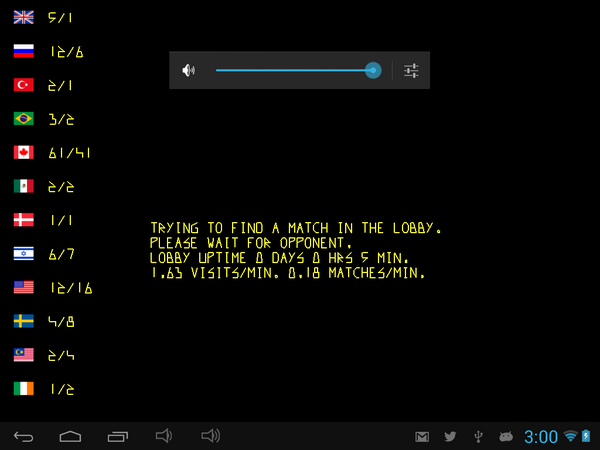
Rendering flags for online users.

So I've ported my Buggy Bang! Bang! game to Android, and released it under the name Six Wheels and a Gun or SWAAG for short. While doing this port I wrote a multiplayer networking system from scratch, including the lobby server. When doing online multiplayer, I thought it would be nice to render flags for the players based on the country associated with the IP number. I've open sourced this piece of technology as ip2ensign which is available at GitHub.