Friday, January 5, 2018

2017 Totals

So, The Little Crane That Could is waning. Here are the 2017 results (Number of free Downloads.) It did manage to surpass a 19M lifetime downloads.

2017 2016 2015 2014 2013 2012 2011
iOS 191K 416K 630K 1300K 3199K 3454K 1550K
Android 1100K 1515K 1525K 825K 1579K 1656K -
Mac 10K 20K 30K 53K 81K -
OUYA - - 0K 4K 15K - -
Kindle 9K 48K 52K 46K 95K - -
Rasp Pi - - ? ? 6K - -

Friday, December 15, 2017

Too late for the modern Gold Rush?

Quick, name the one technology that is hotter that Virtual Reality or Machine Learning today. Yep... the hottest thing right now is crypto currency. But did you miss out on the gravy train?

Well, judging from the dizzying levels of the two heavy weights in the crypto world, Bitcoin and Ethereum you could think so. At the time of writing, the price of bitcoin went from ¢24 to $17666,- in 8 years, which is roughly a factor 74,000. It's nigh impossible for bitcoin to repeat that in the next eight years, as there is no room for a $1.3B bitcoin.

Bitcoin got its position as top dog by virtue of being first on the scene. Ethereum got there by the strength of its features, as its blockchain offers a mechanism to write distributed applications and write smart contracts. It is vastly more versatile and more utilitarian than Bitcoin will ever be. For instance, you can use it to implement a cross-breeding, trading platform for virtual kitties with guaranteed pedigree. Sure, it's silly, but it does allow for, among other things, creating cryptographically secured scarce virtual objects.

So Ethereum for the win, then? Well, maybe not. Because of the meteoric rise in the price of Ether (the coin for Ethereum) developers of distributed apps may think twice about running their code on the Ethereum Virtual Machine. When an app is running, it is consuming precious gas. The the price for this gas will quickly become prohibitively expensive.

So if we discount Bitcoin and Ethereum as viable candidates for getting in late, what's left? With over a 1000 to chose from, is there one with a bright future, capable of rising to the top and displacing both Bitcoin and Ethereum? Spoiler: yes there is.

There is an interesting newcomer by the name "NEO." I've seen it described as "China's Ether." I came across it reading a thread about Ethereum killers.

So from what I've been able to ascertain, is that the NEO coin is not mined. If you want NEO, you have to buy it. However, the nice thing about NEO is that as you hold it in your crypto wallet, it generates GAS. Yep, the GAS that is used for running the distributed apps similarly, as Ethereum executes apps. An interesting aspect, right there: gas gets generated by the coins, which means you do not have to spend your precious and rapidly appreciating crypto coin to use the Virtual Machine.

Another possible contender from the aforementioned thread is EOS, by the way. A commenter described it as: "If bitcoin is currency, and ethereum is gas, EOS is land". So that may be worth looking into.

So for the sake of argument, let's say we want to hedge out bets, and get some of those dividend yielding NEO coins. How would you purchase them? Well, they are best purchased using another crypto coin like Bitcoin or Ether. If you don't have those, I suggest you head over to the nearest bitcoin ATM in your city.

With bitcoins in your wallet, it is now time to purchase NEO on an exchange. I recommend Binance (referral link) which has been excellent for me. It has some amazing advantages that other exchanges do not have:

  • No verification needed for below 2btc withdrawals.
  • After signing up you can fund and trade immediately.
  • No fee for withdrawal of NEO.
  • Great trading interface.
  • Easy to use.
  • Based in stable Japan/HongKong without much government interference.

I personally learned this too late, but you do not want to end up with fractional NEO coins. Buying 10.0 or 10.01 NEO is fine. But if you end up with 10.99 NEO, then you can only transfer out the whole coins, and have a less useful 0.99 NEO left over.

With the NEO coins in your Binance account, you can withdraw those for free to a wallet that you created yourself, on your own computer. I recommend the Neon Wallet. Before you withdraw from Binance to your own wallet, make absolutely sure you printed out the private key of your newly created wallet, on paper. And store it in a safe place. Lose your key, and you will lose your coins.

Let me conclude by showing Binance's nifty graph that in real time shows you the volume of buyers and sellers at all price points.
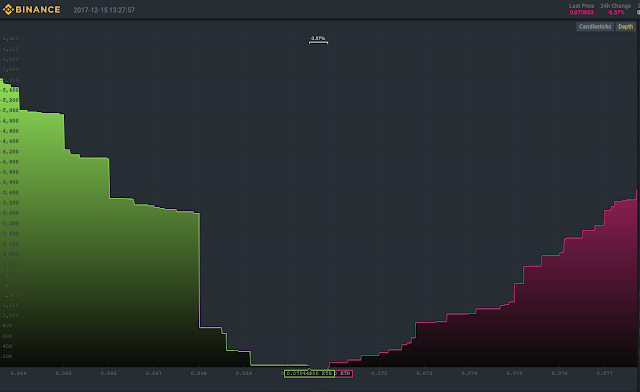
Sunday, November 5, 2017

Profiling on Linux

Speaking of profiling, I wrote an inline profiler for multi threaded Linux apps called ThreadTracer. It's quite good, as it records both wall clock time and cpu time. And on top of that, it also keeps track of pre-empted threads and voluntary context switches.

It's a fine tool, making use of Google Chrome's tracing capability to view the measurements. But for the really low level, micro-sized measurements, we need an additional tool. And this tool is the linux perf tool.

Instead of using perf directly, I found that using the ocperf.py wrapper from PMU-Tools to be a much better option. It has proven to be more reliable for me. You can make it sample your program to see where the cycles are spent. I use the following command line:

$ ocperf.py record -e cpu-cycles:pp --call-graph=dwarf ./bench
$ ocperf.py report -g graph,0.25,caller

In addition to the perf wrapper, it also comes with a great overall analysis tool called toplvl.py which gives you a quick insight into potential issues. Start at level 1 (-l1) and drill your way down to more specific issues, using:

$ toplev.py --long-desc -l1 ./bench

Friday, October 27, 2017

Pitting Profilers against each other.

In the past, I have been using Remotery, an in-app profiler. I recently became aware of Minitrace, a similar app. So I decided to compare results.

The good news is that when my ray tracer is working in single-threaded mode, the results are in agreement. 6ms or so is spent on uploading the image as texture to OpenGL. The rest of the time is spent rendering scanlines.

Minitrace:
Remotery:

I can also run my app in multi-threaded mode. The scanlines are then rendered in 100 work batches. The batches are processed by four worker threads, that are alive during the lifetime of the app.

Minitrace:
Remotery:

The Minitrace run shows that the worker threads were fully busy during the generation of the image. Sometimes, I see a chunk that take a lot more time (> x10) than normal, which made me doubt the measurement. This was the reason I decided to compare to Remotery. However, now I no longer think this is a bad measurement. One of the worker-threads probably got pre-empted by the OS or something.

The Remotery run, on the other hand, seems to be missing data? Could it be a race-condition between worker threads trying to record events? I'll be creating a github issue, but wrote this blog post first, so that the images are hosted.

OS: 64bit Ubuntu Linux.
CPU: Intel(R) Core(TM) i5-4570 CPU @ 3.20GHz
Both Minitrace and Remotery latest version from github as of oct27, 2017.

Thursday, October 26, 2017

sRGB Colour Space - Part Deux.

In part one, I described what you need to do after simulating light before you can show it on a monitor. You need to brighten it by going from linear colour space to sRGB colour space.

Here I talk about how to avoid polluting your calculations with non-linear data. Light intensities can be added or multiplied. But sRGB values cannot. As Tom Forsyth puts it: just as you would not add two zip files together, you would also not add sRGB values.

If you were to take a photograph of a certain material, the image from the camera will typically be in the sRGB colour space. If you want to render a 3D object that has this texture applied to it, then for the lighting calculations you need to get a texel in the linear colour space.

Fortunately, OpenGL can help you out here. If you sample from an sRGB encoded texture, there will be an automatic sRGB->linear conversion applied, so that after the texel fetch, you can actually do calculations with it. To trigger this automatic conversion you need to pass the correct parameters when creating the texture using the glTexImage2D() function. Instead of using GL_RGB8 or GL_RGBA8, you specify the internal format as GL_SRGB8 or GL_SRGB8_ALPHA8. There are also compressed variants: GL_COMPRESSED_SRGB and others.

Be careful that you do not use sRGB textures for content that is not in sRGB. If the content is linear, like maybe a noise map, or a normal map, then you don't want OpenGL meddling with that content by doing a sRGB to Linear conversion step. This kind of data needs to be in a texture with linear colour encoding.

Lastly, when creating mip maps for sRGB, you need to be careful.

sRGB versus Linear Colour Space

I keep screwing up my colour spaces, so I forced myself to write down the rationale behind it. A lot of it comes from Tom Forsyth.

CRT monitors respond non-linearly to the signal you drive it with. If you send it value 0.5 you get less than half the brightness (photons) of a pixel with a 1.0 value. This means, you cannot do light calculations in sRGB space. You need to do them in a linear space.

Once you have calculated the light for your rendered image, you need to send it to the monitor. LCD monitors are made to respond the same way as the old CRT monitors. So the values you send to your framebuffer will end up producing too few photons (too dark.)

To account for this, you need to convert your rendered image from linear colour space to sRGB colour space. This means that all dark pixels need to be brightened up. One way to do this, which avoids manual conversion, is to have OpenGL do this for you. You create a framebuffer that is sRGB capable. With SDL2 you do this with the SDL_GL_FRAMEBUFFER_SRGB_CAPABLE flag to SDL_GL_SetAttribute() function. In iOS you can use kEAGLColorFormatSRGBA8 drawable property of the CAEAGLLayer.

Once you have this special framebuffer, you tell OpenGL Core Profile that you want the conversion to happen. To do this, you use glEnable( GL_FRAMEBUFFER_SRGB );

Note that OpenGL ES3 does not have this glEnable flag. If the ES3 framebuffer is sRGB capable, the conversion is always enabled.

When my renderer does the lighting calculations, it will work in a linear colour space. After rendering, it would produce this linear image:

For proper display on a monitor, we need to account for the monitor's response curve, so we change it into the sRGB colour space. After conversion, the dark colours are brighter:

Yes, much brighter! But hey! What's up with those ugly colour bands? Unfortunately, by converting the values into sRGB, we lose a lot of precision, which means that 8-bit colour channels are no longer adequate. In 8-bits, the three darkest linear values are 0x00, 0x01 and 0x02. After converting these values to sRGB, they are mapped to 0x00, 0x0c and 0x15. Let that sink in... there is a gap of "1" between linear colours 0x00 and 0x01, but a gap of "12" between corresponding sRGB neighbours.

So when we convert from linear to sRGB, we should never convert from 8bit linear to 8bit sRGB. Instead, we convert using floating point linear values. If OpenGL is rendering to a sRGB capable framebuffer, it just needs to read from floating point textures. In my game, the ray tracer now renders to a floating point texture. This texture is then put on a full screen quad onto the sRGB framebuffer, resulting in a correct image:

And that's it for this installment, people. In the future I could perhaps gain more precision by rendering to a framebuffer with 10 bit channels. But for now this is good enough.

Please see part two of this blog post series where I explain what you need to do if you sample textures in your shader and want to do light calculations on that.

Tuesday, September 26, 2017

vtune permissions

Note to self: before running vtune, do:

echo 0 | sudo tee /proc/sys/kernel/yama/ptrace_scope
sudo chmod 755 /sys/kernel/debug
sudo chown -R bram:bram /sys/kernel/debug/tracing