Wednesday, May 1, 2019

My magic bullet for writing multi-threaded code.

When doing my game development there is often a task or two that are just a little too computationally intensive for a smooth framerate. And I put my framerate targets very ambitious: typically 120Hz for proper operation on an iPad PRO. At 120Hz, there is only 8.33ms to do everything: rendering, simulation, ai, physics, etc. So the larger computations that threaten to exceed this, need to be moved off the main thread.

Examples off things that I have computed on their own threads, in my previous projects include: AI action planning, iso surface generation to simulate deformable terrain, crowd flow and path finding.

The biggest hurdle to take when doing multi threaded code, is to avoid race conditions. If two threads are writing to something, which write will persist? Or if a thread reads and another writes, will the reader see the old or the new value? Tricky stuff.

I've found a neat trick to make this whole MT programming thing a lot more manageable. And frankly, after repeatedly using it, I've come to regard it as some sort of magic bullet. In this blog post, I will explain my approach in the hope that it will be useful to other (game) developers.

So the mechanism of choice for me can be summed up in one sentence: concentrate all the synchronization + semaphores + condition variables in just one place: a thread-safe work queue.

This thread-safe queue is then used to set up a producer / consumer system for units of work. The producers live on the main thread and spec well defined pieces of work that need to be performed. Those work specs are put in the queue.

The consumers of these jobs live on worker threads, with one consumer for each thread, and often one thread per CPU core. The job is consumed and the worker thread goes to work, thereby performing the outsourced service that the producer on the main thread did not want to do itself.

Note that the task-queue consumers are the actual service-providers, and that the task-queue producers are the clients of these services that want the computation out-sourced to another thread.
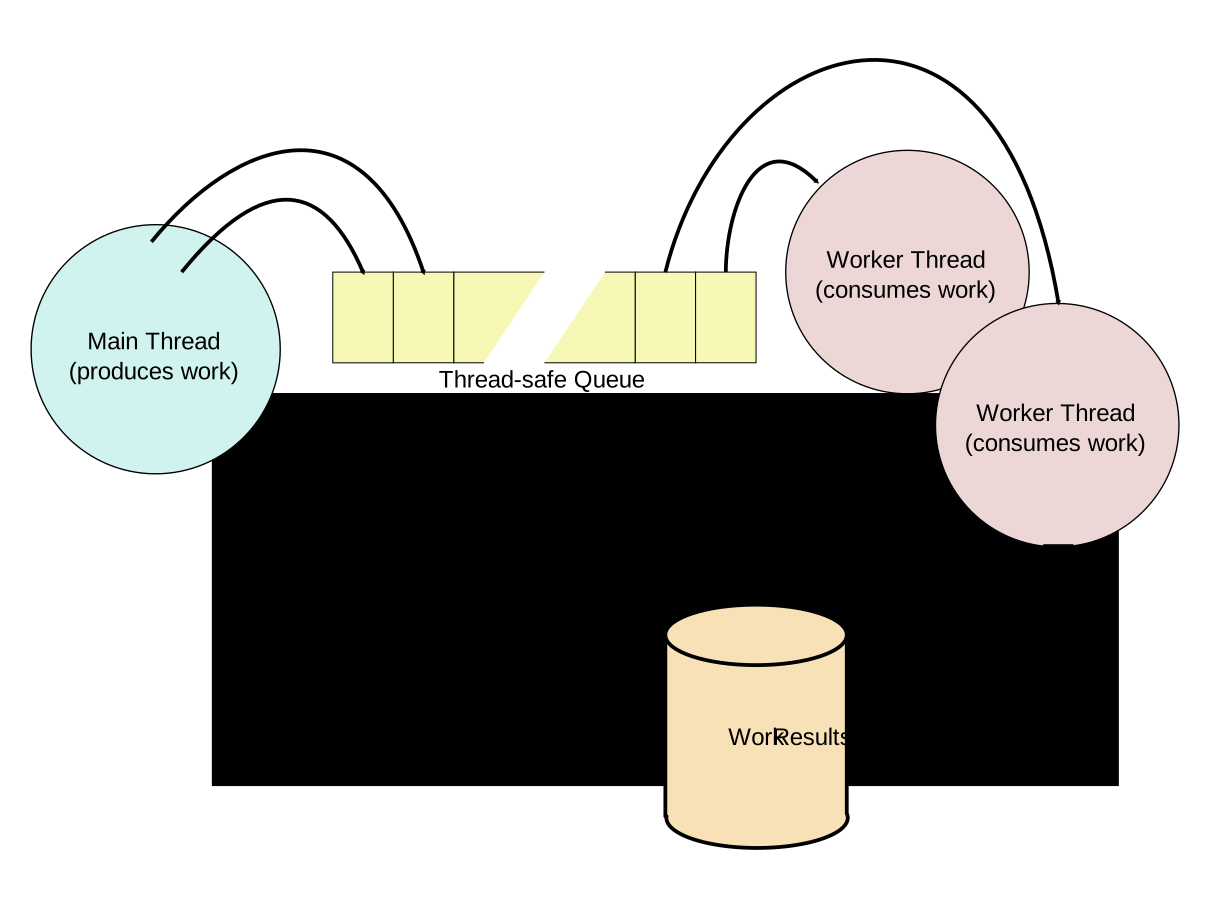
To communicate back the results of the computations, I use nothing fancy. All I do is have the worker write a boolean in memory to signal that the specific work was done. This is not protected by any construct, because there is a well defined order in which things happen: The worker (and only the worker) writes the boolean. The client on the main thread (and only that client) reads the boolean to see if work is done. I do this polling once every simulation frame. Every 'entity' in the simulation that has work outstanding, checks the boolean for completion once per frame, and if it is set, it can safely, use the results that have been stored in main memory. If a client just misses the completion, no biggie! The next simulation frame, it will be picked up.

Note that the magic bullet comes with one big drawback, which may or may not be a big deal in your personal case: You lose determinism. But frankly, deterministic code is elusive anyway. For instance, there is hidden precision in the FPU registers that may be set randomly, so in practice deterministic floating point code is not possible anyway.

The actual implementation of a thread safe queue is beyond the scope of this article, but it involves one mutex, and two condition variables. One condvar to signal that the queue is not empty (wakes up consumers) and one condvar to signal that the queue is not full (wakes up producers.) Of course the queue depth needs to be large enough so that it is never full, because a full queue would temporarily freeze your main thread.

Finally, I want to stress that this approach does not absolve you from being careful. You still need to make sure that a thread is not overwriting nilly willy in the main memory. But the fact that you can safely communicate the work that is req'd and the work that is completed, is at least half the battle.

Tuesday, February 12, 2019

Unreal

After a successful exploration of unity earlier, I though I would test-drive Unreal Engine 4 to see what that is all about. Here are some random observations I made:

  • For linux, the engine and editor have to be built from source. Which is fine, but it does take an hour, and 60Gbyte of disk space.
  • First time starting the editor takes a very long time, and comes with scary warnings to boot.
  • Once you actually try to launch a sample, everything is very slow. Thousands of shaders need to be compiled.
  • Be careful with that quality slider. If you change it from "High" to "Medium" be prepared for another lengthy shader recompilation step.
  • The vulkan renderer would crash at startup with an out-of-memory error. But switching to OpenGL renderer, helped.
  • Out of box performance when launching the "Advanced Vehicle" template was dreadful. I estimate the FPS well below 10 for that. I need to figure out if this is a GPU or CPU bottleneck. Although performance is a lot better if I first quit the editor, and then start the demo application by itself.

Wednesday, February 6, 2019

Crashing apps.

I'm on a mission to reduce my Android game's crashes as much as possible. And it turns out it is incredibly hard to approach a zero crash rate.

First off, I would like you to consider this: If 1% of today's users of your app experienced a crash today, is that bad?

Well, according to Google's metrics system, it gets labelled 'bad' as soon as you exceed 1.09% of users. Which is kind of a weirdly specific number. I don't know where that number comes from.

I love the Google Play Developer Console. It's so much better than any other developer console I've used. These include Valve, Apple and Amazon's developer sites. Google Play defines the crash rate as follows: Crash Rate: Percentage of daily sessions during which your users experienced at least one crash. A daily session refers to a day during which your app was used.

So here you can see how my quest for zero crashes is progressing. The trend looks good:

Now the "Benchmark" is interesting... they compare the crash rate of your app, to a game-category. And the Google Play Developer Console interface let's you change it to a different benchmark. By comparing my game to all the different benchmarks, I could do a comparative study of crash rates in different categories! With out further ado, here's how likely a game of a given genre is to crash:

One thing that stands out to me, is how high these levels are. Crashes in Android apps are actually quite common. If I had to guess, a lot of it could be attributed to fragmentation of the Android devices. So much diversity, and limited means of testing them. Although I have to give a shout-out to the incredibly useful "Pre Launch Reports" that Google offers. The team that does the Developer Console is one hell of a team.

Another source of frustration is the dubious quality of Android's frameworks. Especially the NDK native frameworks. If your app crashes beyond your control in a buggy In-App-Billing framework, or Google-Play-Games framework, there is little you can do.

Still, it is an interesting experiment to see how low I can get my crash rate. Stay tuned for updates on my progress towards my goal of zero crashes.

Thursday, January 31, 2019

Callstack

This call stack, captured from Google Play for one of my apps, shows what's fundamentally wrong with Android.

The app didn't even finish launching, and this is how deep the complexity runs?

backtrace:
  #00  pc 00000000000264f4  /system/lib/libharfbuzz_ng.so (hb_ot_layout_has_glyph_classes+28)
  #01  pc 0000000000049af0  /system/lib/libharfbuzz_ng.so (_hb_ot_shape+192)
  #02  pc 000000000001e008  /system/lib/libharfbuzz_ng.so (hb_shape_plan_execute+140)
  #03  pc 000000000001db30  /system/lib/libharfbuzz_ng.so (hb_shape+84)
  #04  pc 0000000000011b05  /system/lib/libminikin.so (minikin::Layout::doLayoutRun(unsigned short const*, unsigned int, unsigned int, unsigned int, bool, minikin::MinikinPaint const&, minikin::StartHyphenEdit, minikin::EndHyphenEdit)+3780)
  #05  pc 0000000000013991  /system/lib/libminikin.so (minikin::LayoutCacheKey::doLayout(minikin::Layout*, minikin::MinikinPaint const&) const+148)
  #06  pc 0000000000010bf5  /system/lib/libminikin.so (void minikin::LayoutCache::getOrCreate(minikin::U16StringPiece const&, minikin::Range const&, minikin::MinikinPaint const&, bool, minikin::StartHyphenEdit, minikin::EndHyphenEdit, minikin::LayoutAppendFunctor&)+468)
  #07  pc 0000000000010717  /system/lib/libminikin.so (minikin::Layout::doLayoutWord(unsigned short const*, unsigned int, unsigned int, unsigned int, bool, minikin::MinikinPaint const&, unsigned int, minikin::StartHyphenEdit, minikin::EndHyphenEdit, minikin::LayoutPieces const*, minikin::Layout*, float*, minikin::MinikinExtent*, minikin::MinikinRect*, minikin::LayoutPieces*)+234)
  #08  pc 000000000000fcd5  /system/lib/libminikin.so (minikin::Layout::doLayoutRunCached(minikin::U16StringPiece const&, minikin::Range const&, bool, minikin::MinikinPaint const&, unsigned int, minikin::StartHyphenEdit, minikin::EndHyphenEdit, minikin::LayoutPieces const*, minikin::Layout*, float*, minikin::MinikinExtent*, minikin::MinikinRect*, minikin::LayoutPieces*)+1160)
  #09  pc 0000000000010609  /system/lib/libminikin.so (minikin::Layout::measureText(minikin::U16StringPiece const&, minikin::Range const&, minikin::Bidi, minikin::MinikinPaint const&, minikin::StartHyphenEdit, minikin::EndHyphenEdit, float*, minikin::MinikinExtent*, minikin::LayoutPieces*)+1292)
  #10  pc 000000000022ca17  /system/lib/libhwui.so (android::MinikinUtils::measureText(android::Paint const*, minikin::Bidi, android::Typeface const*, unsigned short const*, unsigned int, unsigned int, unsigned int, float*)+82)
  #11  pc 00000000000e1cd5  /system/lib/libandroid_runtime.so (android::PaintGlue::getRunAdvance___CIIIIZI_F(_JNIEnv*, _jclass*, long long, _jcharArray*, int, int, int, int, unsigned char, int)+204)
  #12  pc 0000000000a4758b  /system/framework/arm/boot-framework.oat (android.graphics.Paint.nGetRunAdvance+178)
  #13  pc 0000000000a48e0d  /system/framework/arm/boot-framework.oat (android.graphics.Paint.getRunAdvance+172)
  #14  pc 0000000000a48cab  /system/framework/arm/boot-framework.oat (android.graphics.Paint.getRunAdvance+250)
  #15  pc 0000000001482e99  /system/framework/arm/boot-framework.oat (android.text.TextLine.getRunAdvance+128)
  #16  pc 0000000001483d89  /system/framework/arm/boot-framework.oat (android.text.TextLine.handleText+312)
  #17  pc 0000000001483367  /system/framework/arm/boot-framework.oat (android.text.TextLine.handleRun+566)
  #18  pc 0000000001484f49  /system/framework/arm/boot-framework.oat (android.text.TextLine.measure+216)
  #19  pc 0000000001485bcd  /system/framework/arm/boot-framework.oat (android.text.TextLine.metrics+44)
  #20  pc 00000000017ac2c9  /system/framework/arm/boot-framework.oat (android.text.BoringLayout.isBoring+384)
  #21  pc 0000000001af2d8f  /system/framework/arm/boot-framework.oat (android.widget.TextView.onMeasure+430)
  #22  pc 000000000180ff23  /system/framework/arm/boot-framework.oat (android.view.View.measure+826)
  #23  pc 0000000001a7c3bb  /system/framework/arm/boot-framework.oat (android.view.ViewGroup.measureChildWithMargins+178)
  #24  pc 0000000001c900a1  /system/framework/arm/boot-framework.oat (android.widget.LinearLayout.measureChildBeforeLayout+64)
  #25  pc 0000000001c904ed  /system/framework/arm/boot-framework.oat (android.widget.LinearLayout.measureHorizontal+1060)
  #26  pc 0000000001c91f41  /system/framework/arm/boot-framework.oat (android.widget.LinearLayout.onMeasure+64)
  #27  pc 0000000001f4f553  /system/framework/arm/boot-framework.oat (com.android.internal.widget.ButtonBarLayout.onMeasure+226)
  #28  pc 000000000180ff23  /system/framework/arm/boot-framework.oat (android.view.View.measure+826)
  #29  pc 0000000001d3747d  /system/framework/arm/boot-framework.oat (android.widget.ScrollView.measureChildWithMargins+228)
  #30  pc 0000000001c87141  /system/framework/arm/boot-framework.oat (android.widget.FrameLayout.onMeasure+296)
  #31  pc 0000000001d384f7  /system/framework/arm/boot-framework.oat (android.widget.ScrollView.onMeasure+46)
  #32  pc 000000000180ff23  /system/framework/arm/boot-framework.oat (android.view.View.measure+826)
  #33  pc 0000000001f4eaf3  /system/framework/arm/boot-framework.oat (com.android.internal.widget.AlertDialogLayout.tryOnMeasure+434)
  #34  pc 0000000001f4f13f  /system/framework/arm/boot-framework.oat (com.android.internal.widget.AlertDialogLayout.onMeasure+46)
  #35  pc 000000000180ff23  /system/framework/arm/boot-framework.oat (android.view.View.measure+826)
  #36  pc 0000000001a7c3bb  /system/framework/arm/boot-framework.oat (android.view.ViewGroup.measureChildWithMargins+178)
  #37  pc 0000000001c87141  /system/framework/arm/boot-framework.oat (android.widget.FrameLayout.onMeasure+296)
  #38  pc 000000000180ff23  /system/framework/arm/boot-framework.oat (android.view.View.measure+826)
  #39  pc 0000000001a7c3bb  /system/framework/arm/boot-framework.oat (android.view.ViewGroup.measureChildWithMargins+178)
  #40  pc 0000000001c87141  /system/framework/arm/boot-framework.oat (android.widget.FrameLayout.onMeasure+296)
  #41  pc 000000000180ff23  /system/framework/arm/boot-framework.oat (android.view.View.measure+826)
  #42  pc 0000000001a7c3bb  /system/framework/arm/boot-framework.oat (android.view.ViewGroup.measureChildWithMargins+178)
  #43  pc 0000000001c87141  /system/framework/arm/boot-framework.oat (android.widget.FrameLayout.onMeasure+296)
  #44  pc 0000000001d65865  /system/framework/arm/boot-framework.oat (com.android.internal.policy.DecorView.onMeasure+1252)
  #45  pc 000000000180ff23  /system/framework/arm/boot-framework.oat (android.view.View.measure+826)
  #46  pc 00000000018368f7  /system/framework/arm/boot-framework.oat (android.view.ViewRootImpl.performMeasure+246)
  #47  pc 00000000018353ed  /system/framework/arm/boot-framework.oat (android.view.ViewRootImpl.measureHierarchy+500)
  #48  pc 000000000183733b  /system/framework/arm/boot-framework.oat (android.view.ViewRootImpl.performTraversals+2330)
  #49  pc 000000000183dbb5  /system/framework/arm/boot-framework.oat (android.view.ViewRootImpl.doTraversal+188)
  #50  pc 0000000000d5e83d  /system/framework/arm/boot-framework.oat (android.content.ContextWrapper.getBasePackageName [DEDUPED]+52)
  #51  pc 0000000001515df7  /system/framework/arm/boot-framework.oat (android.view.Choreographer.doCallbacks+966)
  #52  pc 0000000001516675  /system/framework/arm/boot-framework.oat (android.view.Choreographer.doFrame+1396)
  #53  pc 00000000017d6413  /system/framework/arm/boot-framework.oat (android.view.Choreographer$FrameDisplayEventReceiver.run+66)
  #54  pc 000000000130e659  /system/framework/arm/boot-framework.oat (android.os.Handler.dispatchMessage+64)
  #55  pc 0000000001313e8b  /system/framework/arm/boot-framework.oat (android.os.Looper.loop+1162)
  #56  pc 0000000000c905d3  /system/framework/arm/boot-framework.oat (android.app.ActivityThread.main+674)
  #57  pc 0000000000417575  /system/lib/libart.so (art_quick_invoke_stub_internal+68)
  #58  pc 00000000003f125f  /system/lib/libart.so (art_quick_invoke_static_stub+222)
  #59  pc 00000000000a1043  /system/lib/libart.so (art::ArtMethod::Invoke(art::Thread*, unsigned int*, unsigned int, art::JValue*, char const*)+154)
  #60  pc 000000000035093d  /system/lib/libart.so (art::(anonymous namespace)::InvokeWithArgArray(art::ScopedObjectAccessAlreadyRunnable const&, art::ArtMethod*, art::(anonymous namespace)::ArgArray*, art::JValue*, char const*)+52)
  #61  pc 0000000000351d85  /system/lib/libart.so (art::InvokeMethod(art::ScopedObjectAccessAlreadyRunnable const&, _jobject*, _jobject*, _jobject*, unsigned int)+960)
  #62  pc 0000000000302b15  /system/lib/libart.so (art::Method_invoke(_JNIEnv*, _jobject*, _jobject*, _jobjectArray*)+40)
  #63  pc 00000000006ab577  /system/framework/arm/boot-core-oj.oat (java.lang.Class.getDeclaredMethodInternal [DEDUPED]+110)
  #64  pc 000000000165417b  /system/framework/arm/boot-framework.oat (com.android.internal.os.RuntimeInit$MethodAndArgsCaller.run+114)
  #65  pc 000000000165da49  /system/framework/arm/boot-framework.oat (com.android.internal.os.ZygoteInit.main+2896)
  #66  pc 0000000000417575  /system/lib/libart.so (art_quick_invoke_stub_internal+68)
  #67  pc 00000000003f125f  /system/lib/libart.so (art_quick_invoke_static_stub+222)
  #68  pc 00000000000a1043  /system/lib/libart.so (art::ArtMethod::Invoke(art::Thread*, unsigned int*, unsigned int, art::JValue*, char const*)+154)
  #69  pc 000000000035093d  /system/lib/libart.so (art::(anonymous namespace)::InvokeWithArgArray(art::ScopedObjectAccessAlreadyRunnable const&, art::ArtMethod*, art::(anonymous namespace)::ArgArray*, art::JValue*, char const*)+52)
  #70  pc 0000000000350759  /system/lib/libart.so (art::InvokeWithVarArgs(art::ScopedObjectAccessAlreadyRunnable const&, _jobject*, _jmethodID*, std::__va_list)+304)
  #71  pc 000000000029493d  /system/lib/libart.so (art::JNI::CallStaticVoidMethodV(_JNIEnv*, _jclass*, _jmethodID*, std::__va_list)+476)
  #72  pc 000000000006d819  /system/lib/libandroid_runtime.so (_JNIEnv::CallStaticVoidMethod(_jclass*, _jmethodID*, ...)+28)
  #73  pc 000000000006f9cf  /system/lib/libandroid_runtime.so (android::AndroidRuntime::start(char const*, android::Vector const&, bool)+466)
  #74  pc 0000000000001b21  /system/bin/app_process32 (main+880)
  #75  pc 00000000000a2b3d  /system/lib/libc.so (__libc_init+48)
  #76  pc 000000000000176f  /system/bin/app_process32 (_start_main+46)
  #77  pc 0000000000019da9  /system/bin/linker (__dl__ZN6soinfoD1Ev+16)
  #78  pc 00000000007fea64  [stack:ff3b8000]

Wednesday, January 16, 2019

Unity

Two days ago, I started using the Unity3D game development tool. Interestingly, Unity3D is the most pervasive tool in the Game Dev industry... it is everywhere. I've been making games since 1982, but have never used it before.

I'm one of those dinosaurs keeping to the old way of doing things, and making my own game engines. Think of a manual 3-gear transmission Willys Jeep instead of heated seats, 7 cup-holder, navsat SUV.

So far, I like it better than I thought I would. In this blog article, I will collect some gotchas, insights, surprises that I will undoubtedly encounter.

1. Project loads are slow. Once inside the editor, make sure you stop "Playback" before editing anything... all edits during playback will be lost.

2. Unity uses degrees, not radians for angles.

3. You can only use const for compile-time constants. Not for run-time constants, like C and C++.

4. Unity physics is a wrapper over PhysX. Neither uses ERP and CFM like OpenDE and Bullet Physics do.

5. Unity debug output prints vectors with low precision. So (0.0, 0.3, 1.0) can actually be unit length!

6. My bicycle wheel would not spin faster than 7 radians per second, no matter how much torque I applied to it. It turns out that there is a rigid body property that caps it.

7. There is no include directive in the C# language. Instead, files that using the same namespace will automagically find each other's definitions.

8. Centre of mass and inertia tensor are automatically computed from the collision geometry! Beware of this: simulation results will be different just by changing collision geometry, unless you set c.o.m. and inertia explicitly.

9. Monobehaviour.Awake() is called in random order for the Gameobjects. Ugh.

Saturday, January 12, 2019

Sprinkle, Sprinkle, Little Star.

I released a new software application. It is named "Sprinkle, Sprinkle, Little Star" and is available for free for Windows and Linux.

It is a 2D simulation of Gravity acting on a galaxy of stars. It is completely interactive, and you can paint your own galaxy onto a grid, and see the galaxy evolve under Newton's law for gravity.

I recorded a video of myself with a play-though.

I started it during the holiday break, and had fun implementing it. The so called N-Body problem is pretty hard to solve interactively for large numbers of stars, because of its O(N*N) nature: Each star is influenced by each other stars. This means calculating 100M distances if you have 10,000 stars. To do it efficiently, I had to aggregate stars at larger distances. In addition to this, I vectorized my code with AVX intrinsics, that calculates 8 forces in a single go using SIMD. Because my compiler did such a bad job on the scalar code, the speed up was even better than 8, I saw a x18 increase in framerate (which also included rendering, so the computation speed up was even a little more than 18x.) Below is the spatial structure I use to aggregate stars at large distances.

Wednesday, December 26, 2018

Designing a Programming Language: 10Lang.

I have been programming since 1982, I guess that shows my age. But in those 36 years, I have never designed nor implemented a programming language. With the current anti-C++ sentiments on Twitter, it made me ponder on what a better language would look like. So let's start the first tiny steps towards eliminating that "design a programming language" bucket-list item.

Let's start with people jokingly call the hardest part, but really is, the easiest part: the name. As I want my hypothetical language to succeed the prince of all programming languages, C, it only follows that I should name it as a successor the C. Seeing C++ and D are already taken, I see no other option that to call it 10. Or for better Googlability: 10Lang.

If you look at C, you can kind of see that C code is pretty closely modeled after the hardware. Things in the language often have a direct representation in transistors. And if they don't, it's at least not too remote from the silicon, as more complex and more abstract languages are.

What would a good programming model be for today's hardware? For that, let's just look at the main differences between a 1970s processor and a 2018 processor.

One big difference, is that today's CPU has a relatively slow memory. And by slow, I mean, very slow. The CPU has to wait an eternity for data that is not in a register or a cache. This speed discrepancy means that today's CPU can be crippled by things as simple as branches, virtual function calls, irregular data access. What could we do to lead the programmer's mind away from OOP or AoS thinking, and naturally guide her into the SoA or Structure-of-Arrays approach?

Design Decision ALPHA
Arrays come first, scalars second.
If we want our code to be efficient, we need to make sure the CPU can efficiently perform batch operations. The one-off operations can be slower, they are not important from a performance viewpoint. By default, operations should be performed on a range, and doing operations on a scalar should be the special case. Maybe by treating it as array of size 1, maybe by treating it with more verbose syntax, we'll see what works later.

The next big difference between that 1970s processor and today's are the SIMD units. It's probably one of the most distinctive features of a processor nowadays, and will dictate what the register file will look like. So, if we are going to model the programming language after the transistors, then there really are no two ways about it...

Design Decision BETA
SIMD is a first class citizen in the language.
I haven't figured out on how to approach this specifically, yet. First, there is the overlap with design decision ALPHA. SIMD really is kind of like an in-register array. Next, there is the consideration of whether to let the register-width seep through into the language. The C programming language was always pretty vague about how many bits there should be in a char, short or int value. I'm not sure if that was helpful in the long run. But there is int8_t int16_t int32_t now, of course. Would our 10Lang benefit from explicit SIMD widths in the code? I'm hesitant. Maybe yes, maybe no. If we concentrate on 32-bit float/integer values for now, x86_64 can pack 4, 8 or 16 of those 32b values in a 128, 256 or 512 bit SIMD register, using SSE, AVX or AVX-512. I don't believe in accommodating old crap like SSE, so that leaves us with 8 or 16 lanes of 32bits each. (For 64bit values, this would be 4 or 8, which complicates matters further, so let's ignore those for now.) One possibility would be to have native octafloat, octaint, hexafloat, hexaint types. Heck, in an extreme version of language design, we could even leave out the scalar float and int, so that the CPU would never have to switch values from the scalar register file to the SIMD register file, or vice versa. Do we need to accommodate byte access? Maybe not? Text character's haven't been 7 bit ASCII for a long time now. TBD.

Modern processors are complex monstrosities. As we don't want to stall on branching, CPUs make tremendous efforts in predicting branches. At what cost? At the cost of CPU vulnerabilities. Branches hinder efficiency. Instead of making them faster with prediction, why can't we just focus on reducing them instead?

Design Decision GAMMA
Conditional SIMD operations are explicit in code.
So, how do we reduce branch operations? Because memory is now so obscenely slow, often the fastest way to compute things conditionally, is not to branch, but to compute both the TRUE branch and the FALSE branch, and then conditionally select values on a per-SIMD lane basis. Processors have a construct for this. AVX calls this vector blend (as in VBLENDVPS), ARM NEON calls it vector bitwise select (as in VBSL.) The programmer using 10Lang should have explicit access to this construct, so that he may write guaranteed branch-free code if he so chooses. Writing branch-free SIMD code is how you end up with something that is crazy efficient, and just tears through the data and the computations.

With these three main design decisions, it should be possible to sketch out a programming language. So a C like language, but for arrays and SIMD hardware. And I wonder if it could be possible to implement a rudimentary prototype by just using a preprocessor. Just have the 10Lang code translated into plain C with the help of the immintrin.h header file.

But for now, it is feedback time. After reading this, it would be great if you could drop a note in the comments. A folly? An exercise worth pursuing? Let me know!