Saturday, February 27, 2016

Imhotep, Pyramid Builder coming to steam

So, my game Imhotep, Pyramid Builder has been given the green light for publication on Steam. This would make it my second published game for the Steam network. So starting next week, expect a weekly progress report. I found this helped me a lot to bring Little Crane to the Steam market in the shortest possible time.

I will probably overhaul the game mechanic, and make it more like a traditional strategy/building game. Currently it is a build first, and then press PLAY non-interactive simulation. But I will move away from that. I think I will put the price point much lower than I used for Little Crane, Steam edition.

The visuals look a little better now, as I have added light maps. The light maps are static, and computed with the Blender Cycles renderer.

I think a Pyramid Building sim is a world's first. If you know of an earlier title, let me know! Also, the massive scale of the crowd may not be unique, it must at least be incredibly rare. I know of no game title that simulates thousands of people without pausing simulation for off-screen actors. The current implementation requires a CPU with AVX SIMD support, and OpenGL3.2 Core Profile support.

Wednesday, January 27, 2016

Baking Lights using Blender

With Blender you can bake the lights using the Cycles renderer onto light maps. For static geometry, you can get some really nice lighting with diffuse bounces for your models. This posting roughly describes how to achieve this.

Baking requires quite a bit of computational power. It's best to do this on the GPU if you have a fast GPU. If you have an nVidia card, you can use OpenCL to accelerate these computations. Some caveats here: Don't use Ubuntu's blender package: it does not come with OpenCL support. Instead download Blender directly from the Blender site. Next, there is this really quirky bug: Blender cannot find the OpenCL devices if you do not first run a session as root. As root, start blender, then in User Preferences / System, set the render device to OpenCL. Then change the Renderer to Cycles Renderer, and render the cube. Now you can quit Blender and restart it again as a normal user.

Open a new project, go to User Preferences and choose the OpenCL device. Then set the Renderer to 'Cycles Renderer' at the top of the screen. Import the geometry you want process. I find it best to split the geometry per material.

Add some light to your scene. I find that an inverted hemi sphere works fine. Create a new material for this sphere, and make it Emissive (Use Nodes) and you can see the material in the Node Editor. If you want to avoid Light Fall Off, you can add a Light FallOff node, and feed it into the 'strength' with the Constant output.

For each object, Blender will probably have created its own material. Click on 'Use Nodes.' You need to add an unconnected Texture node to the Node View for each material, and give it a newly created texture.

For each of the objects do the following: select it in the 3D view, then go to Edit Mode. When in Edit Mode, under Mesh menu, choose UV Smart Unwrap. Select a small spacing (e.g 0.03).

In the Properties view, select Render, and then set the renderer to GPU computation.

In the Properties view, select Render, and open the Sampling section. You need to increase the sample count to something suitable. You can check the quality by executing a render with F12.

Now in the 3D view, use Object Mode, to select all objects.

In the Properties / Render menu, select Bake to bake out to all light maps attached to the selected objects. You can select what light to bake. I use Combined, but if you want, you can bake Diffuse Indirect only.

After the baking, change the 3D view to the UV Image view, and see what the light maps look like. To see the light maps applied, you can set the 3D View viewing mode from Solid to Textured.

Each Light Map needs to be saved to disk. View it in the UV Image view, and then press F3 and save it out as PNG some where.

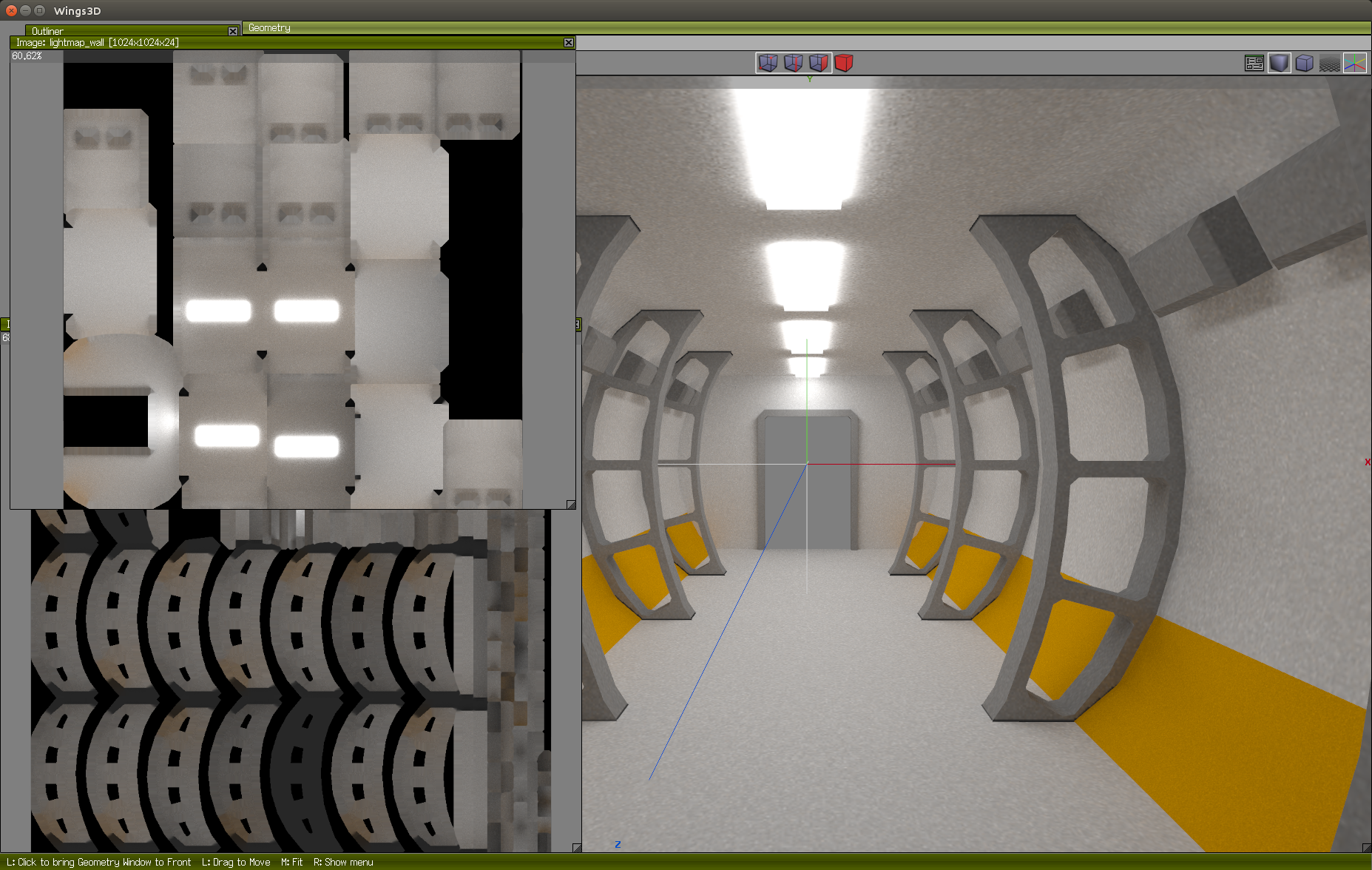
Lastly, do not forget to save the blender project, and export the model again, I use Wavefront OBJ, so that the UV coordinates for the lightmaps get saved. You can use the Wings3D editor to see the results. For this, add Ambient light, and set all materials to Ambient 1,1,1,1 and Diffuse 0,0,0,0.
Monday, January 25, 2016

Screen Space to Object Space in OpenGL.

Something I learned today: if you want to pick a 3D object from mouse coordinates, you can go from screen space coordinates to object space but you need to pay attention to the normalization of the screen space coordinates.

First, to get the screen space coordinate, you can use the mouse location x,y normalized on ( -1..1, -1..1 ) range. You need to supplement this with a z-coordinate that you get from the depth buffer.

glReadPixels( scrx, scry, 1, 1, GL_DEPTH_COMPONENT, GL_FLOAT, &depth);

Where I initially went wrong is, not realizing that this z coordinate needs to be remapped as well, from a 0..1 to a -1..1 range. The hint that lead me to this was looking at this code.

All you then need to do is multiply a matrix with this screen space coordinate to get a model space coordinate. The matrix to multiply is of course the inverse of the model-view-projection matrix. Simple enough to do yourself, so you do not need to link to libGLU just for its gluUnproject() function.

Oh, and do not forget to divide the x,y,z of the multiplication result by its w component.

Friday, January 1, 2016

2015 totals

So, The Little Crane That Could on iOS is straining up hill, but still going. On Android it seems to have caught a second wind. Here are the 2015 results (Number of free Downloads.)

2015 2014 2013 2012 2011
iOS 630K 1300K 3199K 3454K 1550K
Android 1525K 825K 1579K 1656K -
Mac 20K 30K 53K 81K -
OUYA 0K 4K 15K - -
Kindle 52K 46K 95K - -
Rasp Pi ? ? 6K - -

This is the first year that Android downloads bested the iOS download numbers. And by a big margin too. Much of that is to attribute to a feature that the Google Play team did on Little Crane earlier this year.

This adds another 2.2M, totalling a 16.1M lifetime downloads. Hooray for Little Crane!

This was also the year that Little Crane saw its successor release: `The Little Crane That Could² : Mud Play' as it was called on iOS, and as `Little Crane' on Steam. In hindsight, this dual naming was too confusing. Also, it's adoption rate in the market has been modest: 60K free downloads on iOS, and 1383 paid downloads on Steam.

Friday, August 14, 2015

Tracing back my steps.

Last year, I released my game The Little Plane That Could, which included an Android version. For this Android version, I had integrated leader boards and achievements via Google Play Games C++ SDK (also known as gpg-cpp-sdk). I am revisiting this SDK, as I plan to use it in my other titles as well, most prominently, for The Little Crane That Could. I did not keep too many notes during that time, so now I have to reconstruct the steps I took, doing this. This blog post is a brain dump on that matter.

NDK users, it seems, need to gather quite a few pieces from various places. One such piece is a .jar file which involves copying the directory $(ANDROID_SDK_ROOT)/extras/google/google_play_services/libproject/google-play-services_lib to your project directory.

A second piece is gpg-cpp-sdk/ which requires downloading as a .zip file from Game Services SDK Download Page. These are static libraries that you need to reference with the LOCAL_STATIC_LIBRARIES macro as 'gpg-1' in your jni/Android.mk file.

The static libraries in gpg-cpp-sdk/ only come in x86, arm, arm-v7a variants. There is no 64 bit arm variant, neither are there release notes nor a changelog.

In your AndroidManifest.xml file, inside the tag, you need to specify your app id, and the google play services version number, like so:
<meta-data android:name="com.google.android.gms.version" android:value="@integer/google_play_services_version" />
<meta-data android:name="com.google.android.gms.games.APP_ID" android:value="@string/app_id" />

I based my client code on StateManager.h/cpp from a cross platform example..

On the developer portals, a lot of administration is required. This first major hurdle is that there are two different 'developer consoles' that are named similarly, but are very distinct. There is the Google Play Developer Console that manages the entire app. However, for the game services, there is another console named Google Developers Console. The latter is used to manage the use of APIs as there are: Google+ API, Google Play Game Services, Google Play Game Management, Google Cloud Pub/Sub, Drive API.

When linking your apps to the game service, you actually need to link your app twice, once for the release version, and once for the debug version. For this you need to extract SHA1 certificate fingerprints from both your release key, and your debug key. The commands to retrieve those keys are shown below. The default password on the debugkey is 'android'.

$ keytool -exportcert -alias androiddebugkey -keystore ~/.android/debug.keystore  -list -v
$ keytool -exportcert -keystore ~/.ssh/googleplay-release-key.keystore  -list -v

I love it when I read my own stackoverflow solution to a problem I bump into a year later! You need to edit project.properties file.

Thursday, July 30, 2015

Solving quadratic equations on ARM NEON.

So two years ago, I've been coding a function that solves quadratic equations, 8 at a time using AVX. Lately, I have been looking into ARM NEON to see what performance can be had on mobile devices. This is what I came up with. The square root implementation is available pmeerw.

/*
 * solve aX^2 + bX + c = 0
 * solves 4 instances at the same time, using NEON SIMD without any branching to avoid stalls.
 * returns two solutions per equation in root0 and root1.
 * returns FLT_UNDF if there is no solution due to discriminant being negative.
 * For sqrtv() see: https://pmeerw.net/blog/programming/neon1.html
 * I've put the reciprocal of (2*a) in the argument list as this one is fixed in my particular problem.
 */

inline void evaluate_quadratic4
(
        float32x4_t a,
        float32x4_t twoa_recip,
        float32x4_t b,
        float32x4_t c,
        float32x4_t* __restrict root0,
        float32x4_t* __restrict root1
)
{
        const float32x4_t four4 = vdupq_n_f32( 4.0f );
        const float32x4_t undf4 = vdupq_n_f32( FLT_UNDF );
        const float32x4_t minb = vnegq_f32( b );                        // -b
        const float32x4_t bb = vmulq_f32( b, b );                       // b*b
        const float32x4_t foura = vmulq_f32( four4, a );                // 4*a
        const float32x4_t fourac = vmulq_f32( foura, c );               // 4*a*c
        const float32x4_t det = vsubq_f32( bb, fourac );                // b*b - 4*a*c
        // We want only positive roots!
        const uint32x4_t  dvalid = vcleq_f32( fourac, bb );
        const float32x4_t sr = sqrtv( det );                            // approximation of sqrt( b*b - 4*a*c )
        float32x4_t r0 = vaddq_f32( minb, sr );                         // -b + sqrt( b*b - 4*a*c )
        float32x4_t r1 = vsubq_f32( minb, sr );                         // -b - sqrt( b*b - 4*a*c )
        r0 = vmulq_f32( r0, twoa_recip );                               // ( -b + sqrt( b*b - 4*a*c ) ) / (2*a)
        r1 = vmulq_f32( r1, twoa_recip );                               // ( -b - sqrt( b*b - 4*a*c ) ) / (2*a)
        // Filter out negative roots.
        *root0 = vbslq_f32( dvalid, r0, undf4 );
        *root1 = vbslq_f32( dvalid, r1, undf4 );
}

I benched this code on Android Galaxy Note4, against a scalar version. The speed-up I measured was 3.7X which I think is pretty good.

So, yeah, writing intrinsics is totally justified. Doubly so, because I tried to have the compiler auto vectorize, but whatever flag I tried, results hardly differed: -fno-vectorize, -ftree-vectorize and -fslp-vectorize-aggressive all showed the same performance.

Wednesday, July 29, 2015

ARM SIMD

My Pyramid Building Simulator is coming along nicely. Check out the game play video I made for it.

So my Core i5-4570 and nVidia GTX 750Ti run this simulation at an easy 100fps at 1920x1200 pixels. It always leaves me wondering, could it possibly ever be done on mobile, 64 bit iOS or 64 bit Android? If it's possible, it will require some aggressive optimization, as the current code is already AVX SIMD.

But it's an itch I have to scratch: can I do the same on 64 bit ARM NEON? So let's dive into that world: I've never done assembly, intrinsics or SIMD on ARM before, so it's all new to me. I've found a developer that went an interesting route: translate x86 SSE2 to ARM Neon using a translation layer. But I think it pays more to apply ARM Neon intrinsics directly.

So what have I been able to find out so far?

  • This ARM intrinsic reference is a great resource.
  • An old blog post at hilbert-space.de warns against intrinsics being much slower than hand written assembly. I believe this is currently no longer true, as compilers have matured, and this was mainly an issue with older gcc compilers.
  • ARM does have the notion of 16 bit floats, but unfortunately, it seems to be a storage format only, and not suitable for calculations. This is a pity, as it seems to rule out 8-way floating point SIMD on ARM. I may be mistaken, but it looks like you can't do better than 4-way floating point SIMD on ARM, which is a far cry from the x86 world where 8xSIMD (AVX/AVX2) and 16xSIMD (AVX-512) is possible.
  • NEON Intrinsics look like vXXXq_FMT where v signifies the vector nature, q means 128 bits, and FMT specifies integer/float and width. So for instance: vmulq_f32() that multiplies 128 bit vectors containing 32 bit floats, so this would be 4xSIMD.
  • For conditional moving of values (which in x86 parlance is vblendps or fsel in PowerPC speak) you would use Bitwise Select, vbslq, in the ARM Neon world. In NEON, this intrinsic is actually much more natural than the x86 counterpart, as it has a more logical operand ordering. It follows the same ordering as the ?: operator in C: vbslq( condition, iftrue, iffalse ).
  • Writing NEON intrinsics is actually quite enjoyable compared to the x86 world, where MMX, SSE, SSE2, SSE3, SSE4, AVX, AVX2, AVX-512 transitions left the set of intrinsics quite convoluted. The naming scheme in ARM NEON is much cleaner, and requires less use of references as it contains little surprises in naming. The comparison intrinsics are also easier, as there is no third operand as is the case in x86. The type of condition is specified in the name of the intrinsic instead.
  • Ugh, NEON doesn't have square root, or reciprocals. Only an estimate for reciprocal, and an estimate for reciprocal of square root. It looks like pmeerw has a solution to this.

I will update this posting as I learn more about ARM SIMD.